Your document is private.
Its extracted facts still need review.
See what the local reader uses, what becomes a worksheet value, what can be saved and what changes when you export or open an outside service.
Public implementation guide · Reviewed October 18, 2026 · Native release and device validation remain separate.

Document privacy lifecycle
A medical document can contain names, account numbers, dates, addresses and health information. GoldRock’s bill reader minimizes what it carries into the worksheet instead of treating the whole document as a cloud prompt. That is a concrete processing design, not a certification that a document is anonymous. The original, the proposed values, a saved case and an exported letter are different objects with different risks.
Separate the parts that matter.
The original stays the reference
Keep the source available while reviewing. OCR can misread a decimal, a service code or the meaning of an amount. A detected number does not prove that it is the current balance or that two records describe the same care.
Choose a supported, limited file
The browser reader accepts supported PDFs and images within its page and byte limits. The native reader has separate checks for file signatures, image dimensions and PDF size. Large or unclear files can require a smaller local copy or manual entry.
Decide which facts belong
Proposed document totals and service observations start unselected. Confirm the person, provider and services, then confirm each selected value against the original before applying it.
Know your saving choice
A one-time workspace and a protected local vault are different choices. Sign-in and payment records are separate from case-saving controls. Exports and clipboard copies are also separate from the app’s local storage.
Follow the data and the decisions.
- 01
Open the source in the local reader
The browser reads the selected file in the tab. PDF pages are rendered to visible pixels and OCRed using application-served components. The native implementation uses PDFKit rendering and Apple Vision text recognition.
The result of this stepRecognized text for the current reading operation, with possible reading warnings.
- 02
Build a constrained proposal
The bill-review projection keeps supported totals, code/unit observations, fixed warnings and identifier-category flags. It does not include the original PDF or image, raw OCR, matched names, account strings or guessed dates. Mixed or unsupported sources can be withheld.
The result of this stepA transient proposal that you can check, rather than an automatic case update.
- 03
Review exact meaning and document scope
Select the values that belong to the review. Printed line amounts have no default financial meaning: you choose whether they are billed, allowed or patient-responsibility amounts, or leave them blank. Unprinted units remain unknown.
The result of this stepExplicit selections with original-source and scope confirmations.
- 04
Apply only reviewed selections
Chosen amounts can update the worksheet; selected observations append. Changing source facts clears relevant review and completeness confirmations. The local reader discards its proposal when applied or canceled.
The result of this stepAn editable worksheet with sensitive original text kept outside this proposal.
- 05
Use a session or choose protected saving
The browser can encrypt selected local workspace records in its vault. The native vault encrypts device-saved cases and keeps its key in the device Keychain. A local case can still contain private notes or typed identifiers.
The result of this stepThe saving mode you selected, not a promise that all case content is anonymous.
- 06
Review the copy before it leaves the app
A request export requires its own fact, wording and recipient review. A completed form PDF can preserve original document content. Email, downloads, clipboard history and destination services have their own behavior.
The result of this stepA deliberate sharing decision, with no automatic filing or provider negotiation.
A smaller proposal is different from an anonymous document
Original source
PDF or image → local rendering and OCR. The source remains sensitive, even when it never becomes a cloud prompt.
Reviewed working data
Fixed candidate fields → your checks → editable worksheet. Notes and manually entered details can remain identifying.
Saved or shared copy
Optional encrypted local case, or a chosen export. The destination and contents must be reviewed separately.
See the state the app actually shows.
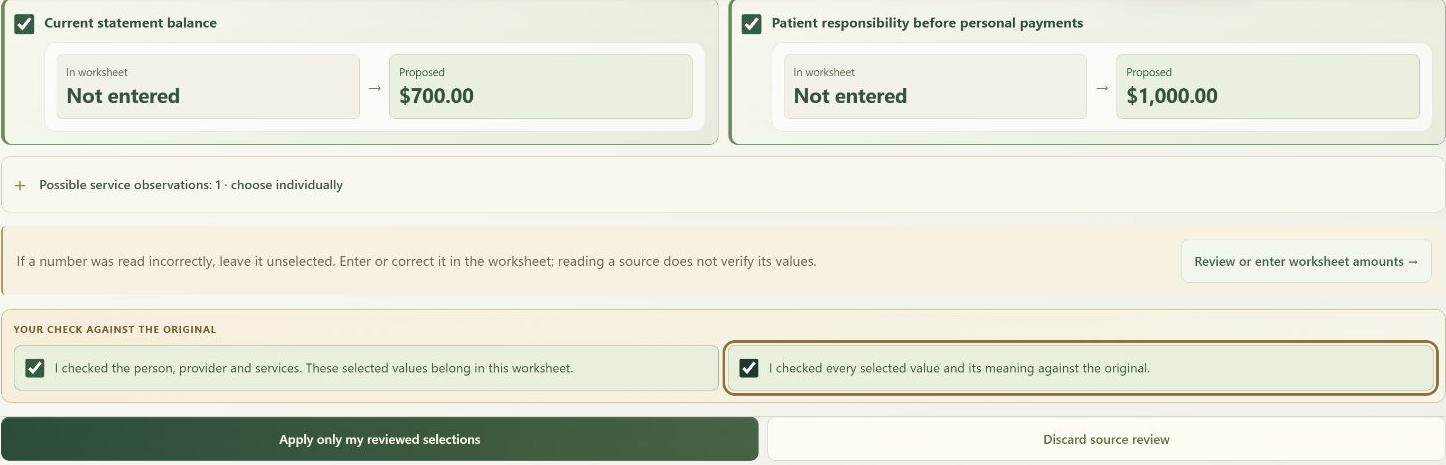
Specifics you can compare.
| Data or action | Primary handling | Important boundary |
|---|---|---|
| Selected bill PDF or image | Local document reader | This reader does not automatically upload the original. The operating system or file provider can retain its own source or temporary copy. |
| Raw recognized text | Current local reading operation | The bill-review proposal excludes raw OCR and matched identifiers. Other local editing or form tools have their own retained working state. |
| Reviewed amounts and case notes | Session or chosen local case storage | The case can still be sensitive. A narrow schema is not a legal de-identification determination. |
| Model download | Public model host → device cache or model folder | Public download traffic exposes ordinary network metadata. Model files are not employee cases. |
| Sign-in, benefit and billing information | Account and payment services | These services operate outside the case vault. One-time case use does not mean an anonymous account. |
| Export, clipboard or outside portal | Destination chosen by the person | An export can contain identifying or health details. Outside services apply their own privacy and retention practices. |
This page describes the implemented boundaries. It is not a claim of HIPAA certification, complete anonymization, forensic erasure or protection from a compromised device.
Practical controls and reviewable outputs.
Visible source-selection controls
The reader shows what is proposed and what is already in the worksheet. It asks for review before applying a selection and does not silently fill unknown payments or assert that a matching EOB exists.
Identifier warnings with a limited purpose
Pattern checks notice some names or identifier-like categories. Native detection also uses Apple language tagging, and an optional system model can suggest exact identifying spans from a bounded excerpt. These are suggestions, not complete PHI removal.
A separate request-only export
The request-delivery boundary can block unfinished known template prompts and missing review confirmations. The final request export contains the edited request, rather than automatically appending the entire private worksheet.
Controls for the records you chose to keep
Local vault locking, erasing and export controls are distinct from model-download removal and account-session controls. Clearing one category does not imply every other category has been erased.
Keep availability and responsibility clear.
Browser vault
The current browser vault uses AES-256-GCM and a passphrase-derived key using PBKDF2-SHA-256 with 600,000 iterations. Authenticated ciphertext is stored in IndexedDB. The passphrase and active key are kept in memory.
Native vault
The Swift implementation uses CryptoKit AES-GCM, device-owner authentication and a device-only Keychain key. The vault file is written with complete file protection and marked excluded from backup. These settings do not control exports or other applications.
Cloud medical-case boundary
The deployed local-only processing policy disables medical-case transmission to the cloud processor. Account, payment and optional product-support services remain separate. A future cloud mode would require its own explicit policy and readiness conditions.
Questions worth answering before you rely on it.
Is GoldRock a guaranteed PII/PHI remover?
No. Local extraction, pattern detection and optional model suggestions can miss sensitive information. OCR can also misread it. GoldRock does not certify that all identifiers have been found or that a document satisfies a legal de-identification standard.
Does the local reader produce a permanently redacted PDF?
No such guarantee is made. Reading visible pixels and selecting a small fact proposal is different from creating an irreversibly redacted copy of the entire original container. A form export can retain original PDF content and must be reviewed before sharing.
What if the PDF contains hidden text or attachments?
The analysis reader renders visible pages rather than treating hidden text, metadata, attachments or links as analysis input. That does not sanitize the original PDF file. Keep the distinction clear if you export or share an original or completed form.
Does a one-time workspace erase every trace?
No forensic-erasure claim is made. Browser or operating-system behavior, downloaded files, screenshots, clipboard tools and file providers can retain information outside the app’s working state. Use a trusted device and inspect the copies you create.
What can product support receive?
The separate support widget can use local help. Its optional live product-support path receives an allowlisted help-topic identifier, rather than arbitrary typed case text. That path does not enable cloud processing of a medical case. Do not paste medical documents or identifiers into support.
Does the employer see the case because it pays for access?
Employer administration concerns eligibility and benefit setup. The employer workspace does not receive the employee’s bill, question, original document, private family activity or medical case content through those administration views.
Understand the process.
Keep your own decisions.
Use the public sample to explore a fictional case, or sign in to review the tools and settings available to your account and device.