The benefit comes through work.
The medical review belongs to the employee.
See how personal sign-in, work verification, employer roles and active benefit access are checked separately from private medical-bill content.
Public implementation guide · Reviewed October 18, 2026 · Native release and device validation remain separate.

Employer administration and employee privacy
GoldRock is designed to be offered as an employee benefit. That requires an administration system, but it does not require giving HR a view of someone’s bill, questions or family medical activity. The employer’s role is to manage who can use the benefit and how it is funded. The employee’s role is to review their own evidence, prepare a response and control their own case-saving and sharing choices.
Separate the parts that matter.
Personal account identity
An employee can use supported managed sign-in independently of their work address. Google or Apple availability depends on the configured provider. A personal sign-in address is not treated as proof of employer eligibility.
Verified work proof
A secondary work email must be verified through the identity provider before it can be used for the employer eligibility check. A typed email, invitation or self-selected role is not the same evidence.
An authorized organization role
The server checks whether the actor is an owner, administrator or explicitly configured platform administrator for the relevant operation. Choosing a different portal view does not grant that role.
A valid benefit and funding state
Being listed on a roster does not by itself establish active access. The service checks the relevant contract, subscription or sponsorship state, paid capacity and the employee’s current eligibility. A draft setup remains a draft.
Follow the data and the decisions.
- 01
Create or enter the right workspace
Personal and employer-facing views are separate. A person with both roles can use the appropriate view, while the backend remains responsible for permission checks.
The result of this stepThe administration view appropriate to the signed-in actor.
- 02
Define the eligibility policy
An employer can manage an exact work-email roster or an eligible organization domain. Consumer-email domains and Apple relay addresses do not become proof that someone works for the company.
The result of this stepAn eligibility policy, not an unrestricted account-sharing code.
- 03
Prove authority over a work domain
The domain-approval path requires a supported trusted approval or a current verified ownership proof. The DNS proof is tied to the still-authorized owner and must be valid and unused when applied. Typing a domain is not approval.
The result of this stepA domain policy that has passed the relevant server check.
- 04
Verify the employee’s work address
The employee adds and verifies their own work email in managed sign-in. The service reads verified provider metadata and compares it with the eligible roster or approved domain policy. Personal and work sign-in identities remain distinct.
The result of this stepA checked connection between a person and an eligible organization.
- 05
Reconcile eligibility and paid capacity
The service checks active funding and capacity before deriving an employee grant. A changed verified email, roster entry, domain or funding state can stop derived access. A successful checkout page alone is not authoritative enrollment proof.
The result of this stepA server-derived access result rather than a client-selected entitlement.
- 06
Use private tools in the employee workspace
The employee reviews bills and prepares requests in their own workspace. Administration responses concern eligibility, enrollment and benefit setup, not the employee’s medical documents or questions.
The result of this stepUseful access without an employer case dashboard.
Three different kinds of information
Account and identity
Sign-in provider verification and account-session information. This is needed for identity and is separate from one-time case use.
Benefit administration
Organization roles, eligibility policy, enrollment and funding state. The employer can administer this part within its permissions.
Private medical work
Bills, reviewed facts, questions, requests and family medical activity. Sponsoring access does not expose these through employer administration.
See the state the app actually shows.
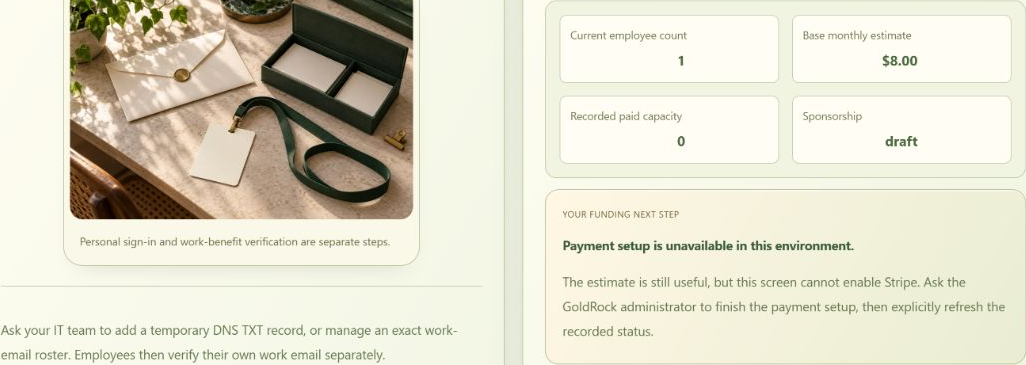
Specifics you can compare.
| Area | What administration handles | What that does not establish |
|---|---|---|
| Organization setup | Name, authorized roles and relevant benefit settings | No automatic right to inspect an employee’s cases |
| Eligibility roster and domains | Work-email eligibility entries and approved organization policies | No proof based only on a typed email or consumer-domain account |
| Enrollment and capacity | Benefit status, funding rules and paid access limits | No active entitlement from a draft setup or checkout redirect alone |
| Family access | Invitation, relationship and membership state within plan rules | No shared medical case or consent to inspect another family member’s documents |
| Employee medical review | Handled in the person’s private workspace | Not included in the employer access-administration view |
| Outside insurer portals | A directory can open an official site separately | No insurer-account connection, imported claims or verified enrollment is implied |
These are the implemented role and data boundaries. They are not a claim of measured employer ROI, an insurer integration, an active contract for every organization or a compliance certification.
Practical controls and reviewable outputs.
Eligibility rules that can be reviewed
Owners and authorized administrators can see the relevant organization access configuration. A roster, domain rule and funding state are different facts, with different verification requirements.
An explicit draft or active state
Employer setup can exist before payments or sponsorship are active. The interface should preserve that distinction instead of presenting an estimate or submitted form as a paid benefit.
Separate employee and family workspaces
A family invitation establishes a proposed relationship and membership path, not permission to open another person’s medical case. Relationship labels and plan limits do not replace the relevant access checks.
An employee benefit with measurable pilot questions
The intended benefit is a clearer next step, less time spent finding help and less stress around medical bills. Retention, performance and financial return are outcomes to study, not established results claimed by this architecture.
Keep availability and responsibility clear.
Trusted identity
Managed authentication verifies provider-owned identity metadata on the server. GoldRock keeps account and benefit metadata needed for those operations; one-time medical-case use does not mean an anonymous account.
Server-enforced permissions
Organization and platform permissions are checked by the backend. Domain ownership, verified work email and paid capacity have separate gates. A role label, browser selection or organization name supplied by the client is insufficient.
Private-case boundary
Employer access administration does not read the employee’s clinical workspace or original documents. The employee’s choices about local saving, model use and exports are separate from the employer’s eligibility administration.
Questions worth answering before you rely on it.
Can HR read the bills because the company pays?
Employer access-administration views concern the benefit, not the medical case. They do not expose employee documents, questions or private family activity. An employee can still choose to share a copy outside the platform, which is a separate decision.
Does Apple Hide My Email count as a work address?
No. A relay address can be a personal sign-in identity, but it is not treated as an employer domain. A verified secondary work email and the employer policy are checked separately.
Can an administrator activate everyone by typing a domain?
No. A domain requires the trusted approval or verified ownership path, and employee access still depends on provider-verified work identity and the relevant funding/capacity checks.
Does a roster guarantee benefits are active?
No. The contract, subscription or sponsorship state and available capacity matter. The captured setup explicitly shows a draft with no recorded paid capacity.
Are family medical records shared with the employee sponsor?
A family relationship and invitation do not grant permission to open another person’s medical cases. Family membership, active plan entitlement and private-case access are separate concepts.
Are privacy and employment outcomes independently certified here?
This page explains the current implementation. It does not present an independent compliance certification or proven retention, productivity or stress-reduction result. Those require separate review or measurement.
Understand the process.
Keep your own decisions.
Use the public sample to explore a fictional case, or sign in to review the tools and settings available to your account and device.